Why do manufacturing companies struggle with document management software?
By the smrtr Team | July 2026
You’ve been researching.
What software is best for manufacturers that integrates with your ERP?
We’re asked this everyday.
Walk any shop floor, and you’ll find the same scene: an operator flipping through a binder for the current work instruction, a quality manager digging through shared drive folders before an audit, a supervisor texting a supplier for a certificate of analysis that should have been on file months ago. None of this is a training problem. It’s a manufacturing document management problem — and it’s one that generic file storage was never built to solve.
For operations and quality leaders, document control isn’t a back-office nicety. It’s the thing standing between a clean audit and a finding, between a fast changeover and a line stoppage, between a recall that’s contained in hours and one that spirals for weeks. So what should you actually look for when you’re evaluating a system to fix it? Here’s the practical guide.

Why Generic Document Management Software Falls Short on the Floor
Most manufacturers didn’t set out to build a document mess. It happened gradually — a shared drive here, a SharePoint site there, PDFs emailed as attachments, binders at the workstation because “the system is too slow to load on the floor.” Generic document management software, the kind built for general office collaboration, tends to fail manufacturers in a few predictable ways:
- No connection to the ERP. Work instructions, specs, and supplier certifications live in one system while production, quality, and inventory data live in another. Nobody can trust that the document tied to a work order is actually the current revision.
- Version control that depends on people, not process. When “final_v3_USE_THIS_ONE.pdf” is a real file name in your archive, you don’t have version control — you have version guessing.
- Compliance features bolted on, not built in. Audit trails, retention schedules, and approval routing get handled through email threads and spreadsheets rather than automated workflows, which means every audit becomes a scavenger hunt.
- Poor performance where it matters most. A tool that works fine in a corporate office often stalls out, requires downloads, or simply isn’t accessible on a shared terminal at a noisy, gloved, time-pressured workstation.
These aren’t edge cases. They’re the everyday manufacturing challenges that quality and operations leaders are already living with — and they’re exactly why so many manufacturers are re-evaluating their document strategy as part of a broader push toward digital transformation.
“Before smrtr, our quality team spent the first two days of every audit just tracking down paperwork. Now everything a plant, a product line, or an auditor needs is in one place, tied directly to our ERP. We’ve cut our audit prep time down to hours.”
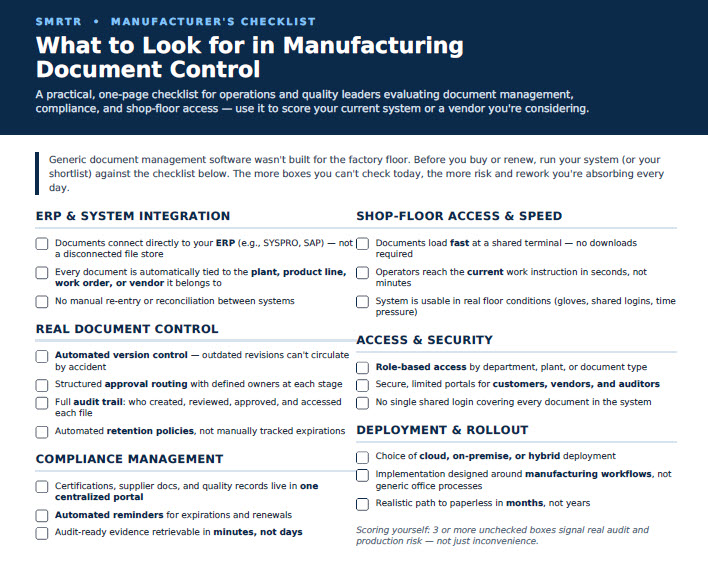
What to Look for in a Manufacturing Document Control System
If generic tools weren’t built for the floor, what does “built for manufacturing” actually mean? Here’s what to evaluate.
1. Deep ERP Integration [smrtr’s specialty!]
Document control shouldn’t live in a silo next to your ERP — it should be part of the same operational fabric. Look for a system that integrates directly with the platforms you already run (SYSPRO, SAP, and similar ERPs are common examples), so that a document is automatically tied to the plant, product line, work order, or vendor it belongs to. When document control and your ERP speak the same language, there’s no manual reconciliation and no guessing about which record is current.
2. Real Document Control, Not Just Storage
Storage keeps files. Document control governs them. That means:
- Automated version tracking, so outdated revisions can’t accidentally circulate
- Structured approval routing with defined owners at each stage
- Full audit trails showing who created, reviewed, approved, and accessed every document
- Automated retention policies that keep you compliant without someone manually tracking expiration dates
3. Compliance Management Built In, Not Bolted On
For regulated and audit-heavy environments, compliance management can’t be an afterthought. The right system should let you manage certifications, supplier documentation, and quality records in one centralized portal, with automated reminders for expirations and renewals. When an auditor asks for evidence, you should be able to produce it in minutes — not days.
4. Fast, Reliable Access on the Shop Floor
This is where generic tools consistently break down. Document control software for manufacturing needs to be fast and accessible right at the workstation — no long load times, no downloads required, no hunting through nested folders while a line waits. Operators need the current work instruction the moment they need it, not the version that was current last time someone updated the binder.
5. Controlled, Role-Based Access
Not everyone needs — or should have — access to every document. Look for systems that let you define access by role, plant, department, or document type, and that let you extend secure, limited-access portals to customers, vendors, and auditors without giving them the keys to everything else.
6. Flexible Deployment
Manufacturers operate differently depending on size, industry, and IT infrastructure. A strong document control platform should offer the choice of cloud, on-premise, or hybrid deployment, so you get the accessibility of the cloud where you want it and the control of on-premise where you need it — not a one-size-fits-all mandate.
7. A Clear Path to Digital Transformation Without Disruption
Rolling out new document control shouldn’t mean months of disruption. Look for a partner who can move you from paper and shared drives to a fully digital, centralized system in a matter of months, not years, with implementation support that understands manufacturing workflows specifically — not generic office processes retrofitted for the floor.
“Our operators used to keep binders at every workstation because the old system was too slow to trust on the floor. With smrtr, they pull up the current work instruction in seconds, and I no longer worry about someone working off an outdated revision.”
The Real Cost of Getting This Wrong
Every missing document, expired certification, or outdated work instruction on the floor carries a cost — in scrap, rework, delayed shipments, failed audits, or worse. Manufacturers that continue relying on shared drives, email chains, and binders aren’t just accepting inefficiency; they’re accepting risk that compounds every time a new product launches, a new plant comes online, or a regulator shows up unannounced.
The manufacturers who get ahead of this treat document control as core operational infrastructure — not an IT afterthought.
Why smrtr
smrtr was built specifically for operations-heavy industries like manufacturing, food and beverage, and distribution — not adapted from a general-purpose office tool. That distinction shows up in the details that matter most to quality and operations leaders:
- ERP-integrated by design, with real-time connections to systems like SYSPRO and SAP, so documents stay tied to the plant, product line, vendor, and process they belong to
- Centralized, secure, and searchable document control that replaces filing cabinets and scattered folders with one governed system
- Compliance-ready, with automated audit trails, retention policies, and a centralized portal for certifications and supplier documentation
- Controlled access at every level, including dedicated portals for customers, vendors, and auditors
- Flexible deployment across cloud, on-premise, or hybrid environments
- Fast implementation, with manufacturers able to move to a paperless, digital system in as little as 90 days
For operations and quality leaders who are tired of chasing down documents, patching together compliance evidence, and asking the floor to work around software that wasn’t built for it, that combination is the difference between managing documents and actually controlling them.
Ready to see what document control built for manufacturing looks like in practice? Schedule a demo with smrtr and find out how fast your team can go paperless.
MANUFACTURERS CHECKLIST [download this one!]