
Every manufacturing operation depends on documents. Work instructions, quality records, certificates of analysis, engineering change orders, supplier certifications, and batch records keep production moving and auditors satisfied.
When those documents are outdated, missing, or scattered across departments, the consequences show up fast. Failed audits. Production delays. Regulatory citations that put your entire operation at risk.
This guide covers everything you need to know about manufacturing document management. You will find actionable frameworks to modernize how your team creates, approves, distributes, and retires critical documents.
smrtr connects documents, approvals, and compliance workflows directly to your ERP, giving manufacturing teams a single source of truth for every operational record. That ERP-connected approach is central to what this guide explores.
Key Takeaways: The Complete Guide to Manufacturing Document Control
- Document control failures are among the most frequently cited categories in FDA 483 observations and regulatory audits.
- Audit readiness depends on version control, access restrictions, automated retention policies, and complete audit trails.
- ERP integration eliminates the gap between your document system and production data, reducing duplicate entry and errors.
- smrtr gives manufacturers ERP-connected document control with automated capture, indexing, and role-based access.
- Mid-sized manufacturers can modernize document control in phases, starting with the workflows that carry the highest compliance risk.
What Is Document Control in Manufacturing?
Document control is the structured process of creating, reviewing, approving, distributing, and retiring the documents that govern your manufacturing operations. It covers SOPs, work instructions, batch records, quality specifications, and engineering drawings.
The purpose is straightforward: make sure the right version of every document reaches the right person at the right time. Every change must be tracked, justified, and retrievable. In regulated environments, this is not optional.
ISO 9001, ISO 13485, FDA 21 CFR Part 211, and the new QMSR all require controlled documented information.
Document control is different from document management, although the two terms are often used interchangeably. Document management is the broader discipline of storing, organizing, and retrieving files. Document control adds version control, approval workflows, access restrictions, and retention policies on top.
Why Does Document Control Fail in Manufacturing?
Most document control failures are not caused by negligence. They are caused by processes designed for a smaller, simpler operation that never scaled. Here are the conditions that create the biggest gaps.
Outdated Documents on the Production Floor
An operator pulls a work instruction from a shared drive or a laminated binder. That instruction reflects Revision B, but Revision D was approved six months ago.
The change control process handles approvals well, but nobody retrieves and replaces the old copies at every point of use. This is the single most common document control observation in FDA 483 citations, according to a 2026 analysis by Aurora TIC.
Disconnected Storage Locations
Engineering drawings live in one system. Quality records sit in another. Supplier certificates are buried in email attachments.
When an auditor asks your team to produce the current approved version of a procedure, retrieval takes 15 minutes instead of 15 seconds. That delay signals a deeper problem: your documents are not under centralized control.
No Link Between Documents and ERP Data
Your ERP tracks purchase orders, production schedules, and inventory. Your documents track the procedures, certifications, and records that support those transactions.
If those two systems are not connected, your team fills the gap with duplicate data entry and manual lookups. Every handoff introduces an error opportunity.
Change Control That Stops at Approval
Approval workflows are the part of change control that most teams build first. Retirement workflows are the part they skip.
When a revised SOP is approved but the prior version is never formally retrieved, voided, and destroyed at every point of use, you have an uncontrolled document in circulation. That is a direct audit finding.
What Does an Audit-Ready Document Control System Look Like?
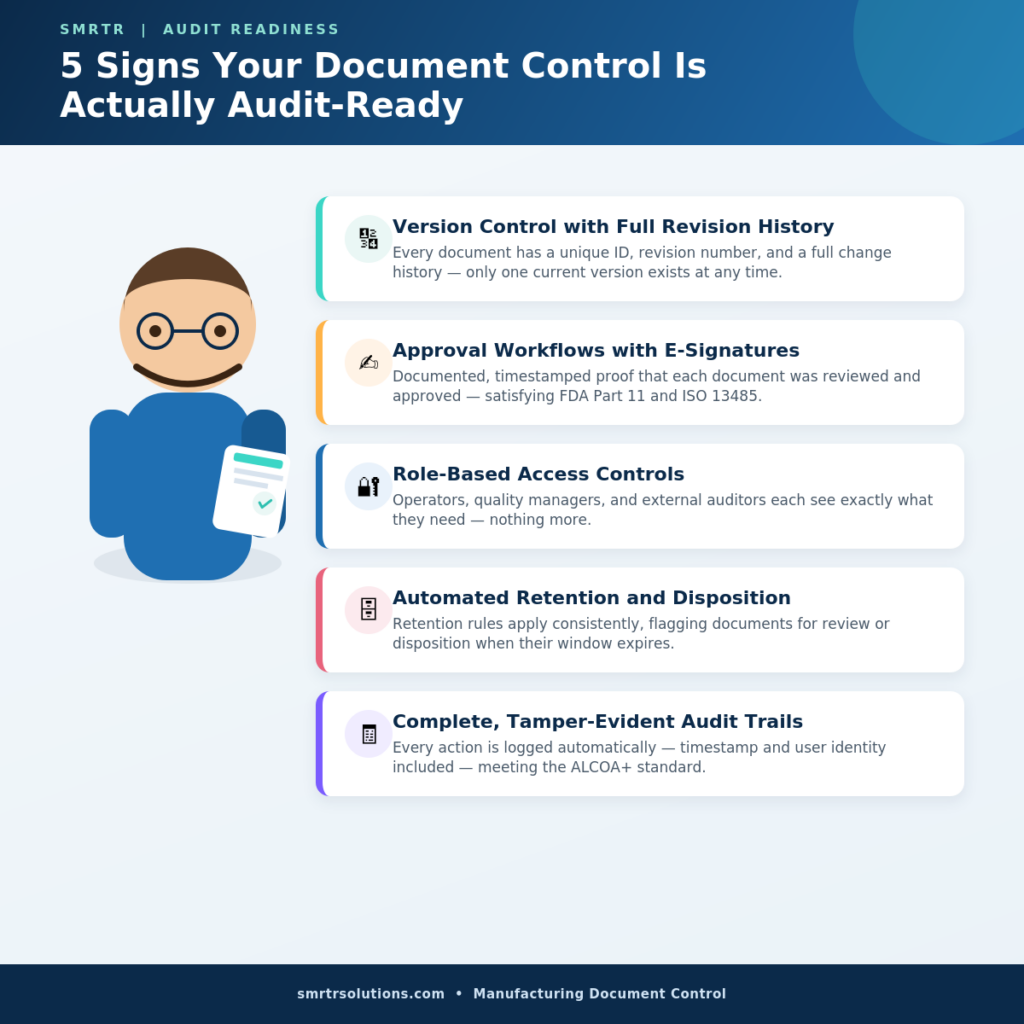
Audit readiness is not a checklist you complete the week before an inspector arrives. It is a system state. Your document control processes are audit-ready when they can withstand scrutiny at any moment, without advance preparation.
✅Version Control with Full Revision History
Every document must carry a unique identifier, a revision number, and a complete history of changes. Auditors expect to see who made each change, when, and why.
Version control also means that only one version of any document is current at any time. Prior versions are archived (not deleted) for reference.
✅Approval Workflows with Electronic Signatures
Regulated manufacturers need documented proof that each document was reviewed and approved by qualified personnel before release.
Electronic signatures tied to user authentication satisfy FDA 21 CFR Part 11 and ISO 13485 requirements. They also create an immutable record that paper sign-off sheets cannot replicate.
✅Role-Based Access Controls
Not everyone needs access to every document. Role-based access ensures operators see the work instructions relevant to their station and quality managers can approve and release documents.
External auditors view only what you choose to share. Access restrictions also protect sensitive intellectual property and proprietary formulations.
✅ Automated Retention and Disposition
Regulatory frameworks specify how long you must retain certain records. FDA requires batch production records for at least one year past the expiration date of the product.
Automated retention policies apply these rules consistently, flagging documents for review or disposition when their retention period expires.
✅Complete, Tamper-Evident Audit Trails
Every action taken on a document must be logged with a timestamp and user identity. FDA’s ALCOA+ framework (Attributable, Legible, Contemporaneous, Original, Accurate, Complete, Consistent, Enduring, Available) defines what a trustworthy audit trail looks like.
Your system should produce this trail automatically, without relying on users to log their own actions.
How to Build a Document Control Process: A Step-by-Step Framework
Building document control from scratch, or rebuilding a process that has outgrown its original design, requires a structured approach. Follow these steps to create a system that scales with your operation.
Step 1: Inventory Your Current Document Landscape
Before you can control your documents, you need to know what exists and where. Catalog every document type your operation depends on: SOPs, work instructions, batch records, quality specifications, engineering drawings, supplier certifications, training records, and calibration logs.
Note where each type is stored, who owns it, and how changes are currently managed.
Step 2: Define Your Document Hierarchy and Naming Conventions
Create a tiered structure. Level 1 documents might be your quality manual and quality policy. Level 2 could include SOPs and procedures. Level 3 might cover work instructions, forms, and templates.
Assign a consistent naming convention that includes the document type, department, sequence number, and revision level. This makes retrieval faster and reduces confusion across facilities.
Step 3: Establish Change Control Procedures
Map out the full lifecycle: request, review, approve, release, distribute, train, and retire. Assign clear ownership at each stage.
Specify who can request a change, who reviews it, who approves it, and who is responsible for retiring the superseded version. Include a formal step for retrieving and voiding outdated copies at every point of use.
Step 4: Implement Technology That Connects to Your ERP
A document control system that sits outside your ERP creates an information island. When your document management platform integrates directly with your ERP, purchase orders link to supplier certifications and production orders link to batch records.
smrtr connects documents and workflows directly to ERP platforms like Syspro and SAP, eliminating the gap between operational data and the records that support it.
Step 5: Configure Access Controls and Permissions
Map every role in your organization to the documents they need. Production operators need read access to current work instructions. Quality managers need edit, review, and approve access.
Plant managers may need dashboard-level visibility. External stakeholders, such as auditors and key customers, can be given controlled portal access to specific document sets without exposing your full system.
Step 6: Train Your Team and Document the Training
Training is a control point, not an afterthought. Every person who interacts with controlled documents needs to be trained on the current procedures. That training must be recorded with the specific document revision it covers.
When Revision D replaces Revision C, your compliance system should flag everyone whose training record still references the prior version.
Step 7: Run a Mock Audit Before Going Live
Give someone on your team the role of an FDA investigator or ISO auditor. Ask them to request the current approved version of five randomly selected SOPs from the production floor.
Time the retrieval. Verify that the retrieved version matches what your document control system shows as current. If retrieval takes longer than two minutes or produces a mismatched revision, you have a gap to close.
How ERP Integration Changes Manufacturing Document Control
Most document control discussions focus on the documents themselves: version numbers, approval workflows, retention periods. That is necessary, but it misses a critical dimension. In manufacturing, documents do not exist in isolation.
Linking Documents to Transactions Automatically
When a purchase order is created in your ERP, the corresponding supplier certificate of analysis should be automatically linked. When a production order is completed, the associated batch record and quality check results should be attached.
This linking eliminates the retrieval problem: you do not need to search for the document because it is already connected to the transaction it supports.
smrtr’s document management for manufacturing automates this connection. Documents are captured, indexed with metadata from your ERP, and stored in a centralized repository accessible from the shop floor to the front office.
Eliminating Duplicate Data Across Systems
Without integration, your team enters the same data in the ERP, the quality system, the document management tool, and possibly a separate training database. Each entry is an error opportunity.
ERP-connected document control means data flows once and is referenced everywhere, reducing the number of touchpoints where mistakes occur.
Real-Time Visibility for Compliance Teams
When your documents are connected to your ERP, your compliance team gets a live view of document status across every facility. Which SOPs are overdue for review? Which supplier certifications expire next month?
smrtr delivers centralized compliance dashboards that give your team real-time visibility into document status, expiration dates, and approval queues.
Document Control for Regulated Industries: FDA, ISO, and FSMA
Different regulatory frameworks have different requirements for document control, but the underlying principles overlap significantly. Here is how the major frameworks apply to manufacturing.
FDA 21 CFR Part 211 and 21 CFR Part 11
Pharmaceutical and food manufacturers operating under FDA oversight must maintain production records, laboratory records, and distribution records under strict controls.
Part 11 adds requirements for electronic records: validated systems, audit trails, electronic signatures, and access controls. If your document control system is electronic, Part 11 compliance is not optional.
ISO 9001 and ISO 13485
ISO 9001 requires organizations to control documented information as part of their quality management system. ISO 13485, specific to medical devices, adds more prescriptive requirements for document approval, review cycles, and change control.
The new QMSR regulation, effective February 2026, directly references ISO 13485:2016 Section 4.2. This makes these requirements federal law for device manufacturers in the United States.
FSMA Section 204 and Food Safety Traceability
For food manufacturers, FSMA Section 204 requires additional traceability records, known as Key Data Elements (KDEs) and Critical Tracking Events (CTEs). These records must allow the FDA to trace a food product through the supply chain in hours, not days.
Food safety compliance software from smrtr automates the collection of KDEs and CTEs, connecting traceability records to your ERP and making them retrievable on demand.
How Mid-Sized Manufacturers Can Modernize Document Control
Large enterprises have dedicated document control departments and six-figure software budgets. Mid-sized manufacturers, the 50-to-500-employee operations that form the backbone of American manufacturing, often do not.
That does not mean modernization is out of reach. It means the approach needs to be phased and practical.
▶️▶️Start with the Highest-Risk Workflows
You do not need to digitize everything at once. Start with the document workflows that carry the highest compliance risk: batch records, SOPs for critical processes, supplier certifications, and training records.
These are the documents auditors ask for first, and they are where gaps create the most exposure.
▶️▶️Choose Technology That Fits Your Existing Systems
A document control platform that requires you to replace your ERP or rebuild your quality system is not practical for mid-sized operations. Look for solutions that integrate with your existing ERP and can be deployed in the cloud, on-premise, or in a hybrid configuration.
smrtr supports all three deployment models and integrates natively with Syspro, connecting documents directly to ERP workflows without forcing a system overhaul.
▶️▶️Build Internal Ownership Early
Document control works when someone owns it. Assign a document control coordinator or a small cross-functional team that includes quality, operations, and IT.
This team is responsible for maintaining the document hierarchy, managing change control, and running periodic reviews. Without clear ownership, even the best technology reverts to uncontrolled chaos.
How to Measure Document Control Effectiveness
Track metrics that reflect the health of your document control process. Average time to retrieve a document. Percentage of SOPs reviewed on schedule. Number of document control deviations per quarter.
Training completion rates tied to current procedure versions round out the picture. These numbers tell you where the system is working and where it needs attention.
Common Document Control Mistakes and How to Avoid Them
Even well-intentioned document control programs develop blind spots over time. Here are the mistakes that create the most risk and the fixes that address them.
🎯Treating Document Control as an IT Project
Document control is an operational discipline, not a technology deployment. The software is a tool. The process, the change control procedures, the review schedules, and the training protocols are what make the system work.
When IT owns document control without quality and operations involvement, the system often meets technical requirements but misses the operational realities of the production floor.
🎯Relying on Email for Approval Routing
Email is not a controlled system. Approvals routed through email are difficult to track, easy to lose, and impossible to audit reliably.
smrtr replaces ad hoc email approval routing with structured, automated workflows that route documents to the right approvers, track response times, and escalate when deadlines are missed.
🎯Ignoring Supplier Documents
Your document control system should not stop at your facility walls. Supplier certificates of analysis, insurance documents, food safety certifications, and qualification records all need version control, expiration tracking, and centralized storage.
smrtr’s supplier management capabilities automate supplier onboarding and sync supplier, facility, product, and PO data for full visibility and regulatory readiness.
🎯Skipping Periodic Reviews
A document that was accurate two years ago may no longer reflect your current process. Regulatory frameworks require periodic reviews, and your document control process should enforce them automatically.
Set review cycles based on document type and risk level, and use automated reminders to ensure reviews happen on schedule.
What to Look for in Document Control Software for Manufacturing
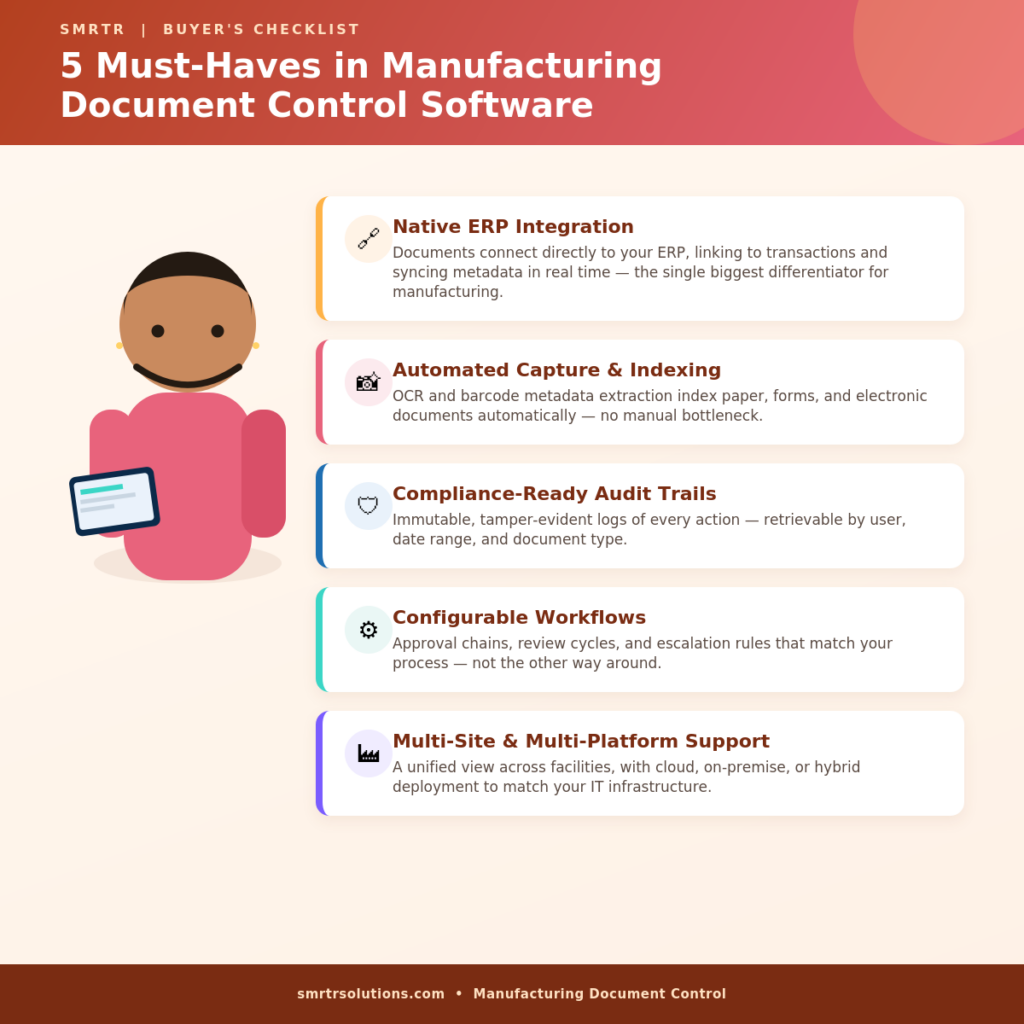
Not every document management system is built for manufacturing. Here are the capabilities that separate a general-purpose file storage tool from a manufacturing-grade document control platform.
💯Native ERP Integration
Your document control software should connect directly to your ERP, linking documents to transactions, populating metadata from ERP fields, and syncing changes in real time.
This is the single biggest differentiator between a system designed for manufacturing and one designed for general office use.
💯Automated Capture and Indexing
SMRTR Capture automates business processes by capturing paper, forms, and electronic documents, then applying OCR and barcode metadata extraction to index them automatically.
This eliminates the bottleneck of slow indexing that affects many Syspro users and other ERP-driven operations.
💯Compliance-Ready Audit Trails
Look for immutable audit trails that log every action with timestamps and user IDs. The audit trail should be tamper-evident and retrievable by user, date range, and document type.
💯Configurable Workflows
Every manufacturing operation has different approval chains, review cycles, and escalation rules. Your document control software should let you configure these workflows to match your process, not force you to change your process to match the software.
💯Multi-Site and Multi-Platform Support
If you operate across multiple facilities, your document control system should give you a unified view while allowing site-specific configurations. Cloud, on-premise, and hybrid deployment options give you the flexibility to match your IT infrastructure.
In Conclusion: How to Make Document Control a Competitive Advantage
Document control is often seen as a cost of doing business in regulated manufacturing. That framing misses the point. A well-designed document control system does more than keep you compliant. It accelerates your operations.
The manufacturers who treat document control as a strategic capability are the ones who respond faster to engineering changes, onboard suppliers more efficiently, and pass audits without the last-minute scramble.
smrtr gives you the document management foundation to make that shift. ERP-connected document control, automated capture and indexing, configurable workflows, and real-time compliance dashboards turn your documents into an operational asset. 20+ years of ERP and manufacturing experience means the team behind smrtr already knows your operation.
FAQs about The Complete Guide to Manufacturing Document Control
What is the difference between document management and document control?
Document management refers to storing, organizing, and retrieving files. Document control adds a governance layer: version control, approval workflows, access restrictions, and retention policies that ensure only current, approved documents are in use.
How does ERP integration improve document control?
ERP integration links documents directly to the transactions they support, such as purchase orders, production orders, and supplier records. This eliminates duplicate lookups and gives your compliance team real-time visibility into document status across every facility.
What regulatory standards require manufacturing document control?
ISO 9001, ISO 13485, FDA 21 CFR Part 211, FDA 21 CFR Part 11, the QMSR (effective February 2026), and FSMA Section 204 all require controlled documented information. Each mandates version control, audit trails, and defined retention periods.
How does smrtr help manufacturers with document control?
smrtr connects documents, approvals, and compliance workflows directly to your ERP. Automated capture, intelligent indexing, role-based access, and immutable audit trails give manufacturing teams a single source of truth for every operational record.
Can mid-sized manufacturers afford to modernize document control?
Yes. A phased approach, starting with the highest-risk workflows like batch records and supplier certifications, keeps costs manageable while delivering immediate compliance benefits. smrtr offers flexible deployment in the cloud, on-premise, or hybrid configurations.
What are the most common document control failures in manufacturing?
The most frequent failures include outdated documents at points of use, missing signatures on batch records, training records that do not reference the current procedure version, unauthorized process changes, and electronic records without verifiable audit trails.